Attacks on Encrypted Files
Objectives:
- Learn how password based encryption protects files such as PDFs and zip archives
- Learn how weak passwords make encrypted files vulnerable
- Learn how attackers use dictionary and brute-force attacks to recover passwords
- Crack the password of an encrypted file to reveal its contents
- Understand the importance of using strong, complex passwords to defend against these attacks
Key Points:
- Different file formats use different algorithms and key derivation methods (how the key is derived, salt use, number of hash iterations)
- Many consumer tools still support legacy or weak modes (particularly older ZIP encryption). This makes some encrypted archives nuch easier to attack than modern schemes
- Encryption protects data confidentiality only. It does not prevent someone with access to the encrypted file from trying to guess the password offline
Types of attacks:
- Dictionary Attack
- Mask Attack
- Brute-force Attack
Practical Tips:
- Start with a wordlist
- If the wordlist fails, move to targeted wordlists (company names, project names, or data from the target)
- If that fails, try mask or incremental attacks on short passwords
- Use GPU accelerated cracking when possible to increase speed of cracking
- Keep an eye on resource use, cracking is CPU/GPU intensive. That behavior can be detected on a modern endpoint
Challenges:
- Crack the PDF
- Crack the zip
I’ll start by using the file command to verify the file types of the given flags.
file flag.pdf
file flag.zip
Tools:
- PDF:
pdfcrack,john - ZIP:
fcrackzip,john - General:
johnorhashcat
I used a dictionary attack to crack the PDF flag’s password
pdfcrack -f flag.pdf -w /usr/share/wordlists/rockyou.txt
The password was “naughtylist”
I was then able to open the pdf and reveal the flag for the first challenge
THM{Cr4ck1ng_PDFs_1s_34$y}
For the zip file I used john, first by creating a hash that it can understand
zip2john flag.zip > flaghash.txt
Then I cracked it the zip password with:
john –wordlists=/usr/share/wordlists/rockyou.txt flaghash.txt
The password was “winter4ever”
From there I can extract the zip, which revealed another .txt file containing the flag:
THM{Cr4ck1n6_z1p$_1s_34$yyyy}
Detection
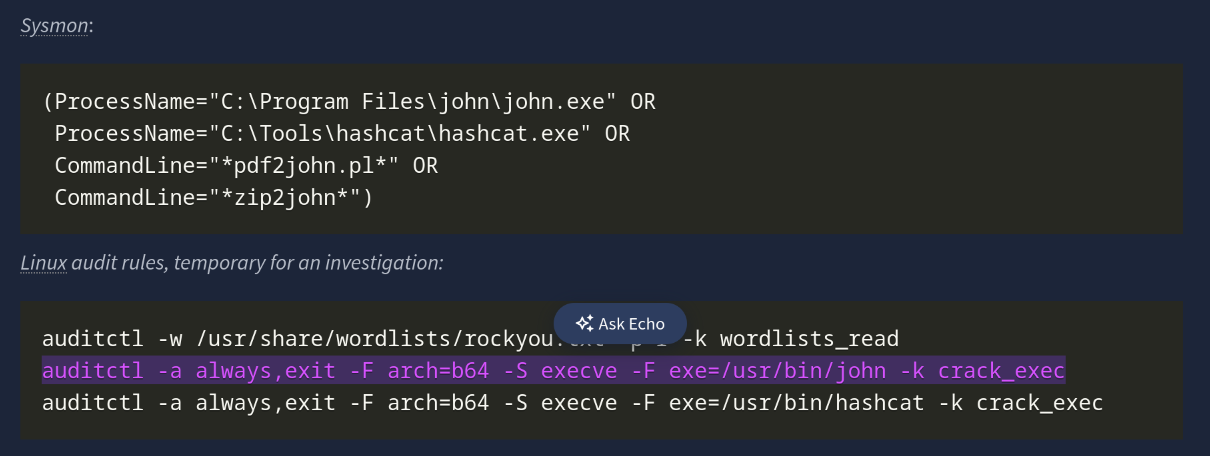
Offline cracking does not hit login services, so lockouts and failed logon dashboards stay quiet. We can detect the work where it runs, and endpoints jump boxes. The important signals to monitor include:
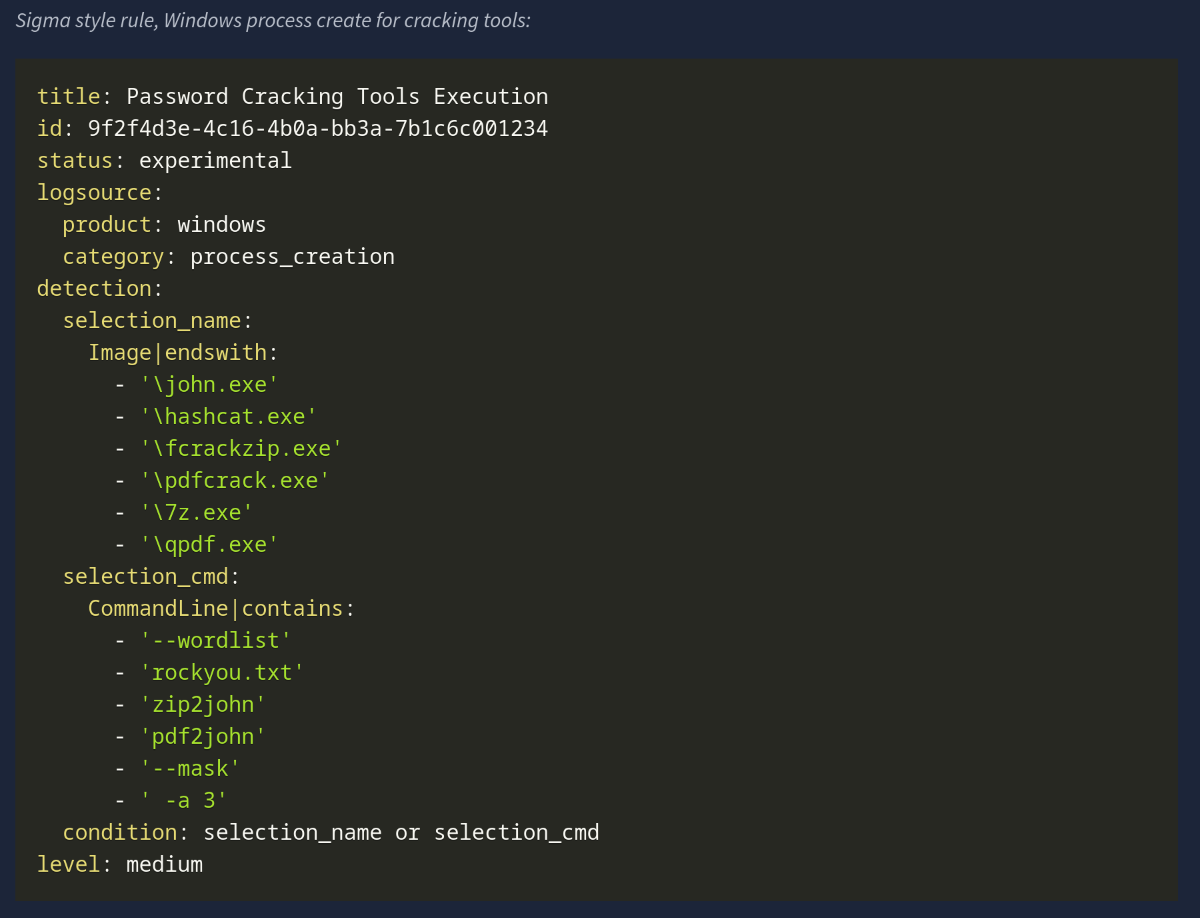
Process Creation: Password cracking has a small set of well-known binaries and command patterns that we can look out for. A mix of process events, file activity, GPU signals, network touches tied to tooling and wordlists. Our goal is to make the activity obvious without drowning in noise.
- Binaries and aliases:
john,hashcat,fcrackzip,pdfcrack,zip2john,pdf2john.pl,7z,qpdf,unzip,7za,perlinvokingpdf2john.pl - Command-line traits:
--wordlist,-w,--rules,--mask,-a 3,-m, in Hashcat, references torockyou.txt,SecLists.zip2john,pdf2john - Potfiles and state:
~/.john/john.pot,.hashcat/hashcat.potfile,john.rec
Windows machines captures process creation with full command line properties with Sysmon Event ID 1. While on Linux, auditd, execve, or EDR sensors capture binaries and arguments.
GPU and Resource Artifacts
GPU cracking is loud and can be picked up and investigated due to the sudden high utilization on the host.
nvidia-smishows long-running processes namedhashcatorjohn- High, steady GPU utilization and power draw while the fan curve spikes
- Libraries loaded:
nvcuda.dll,OpenCLL.dll,libcuda.so,amdocl64.dll
Network Hings, Light but Useful
Offline cracking does not need the network once the wordlists are present. Yet most operators fetch lists and tools first
- Downloads of large text files named
rockyou.txt, or Git clones of popular wordlist repos - Package installs, for example
apt install john hashcat, detected by EDR package telemetry - Tool updates and driver fetches for GPU runtimes
Unusual File Reads. Repeated reads of files such as wordlists or encrypted files would need analysis
Below are some examples of detection rules and hunting queries we can put to use across various environments
Response
- Isolate the host if malicious activity is detected. If it is a lab, tag and supress
- Capture triage artefacts such as process list, process memory dump,
nvidia-smisample output, open files, and the encrypted file - Preserve the working directory, wordlists, hashfiles, and shell history
- Review which files were decrypted. Search for follow on access, lateral movement or exfiltration
- Identify the origin and intent of the activity. If it was not authorized, escalate to the IR team
- Remediate the activity, rotate affected keys and passwords, and enforce MFA for accounts
- Close with education and correct placement of tools into approved sandboxes